Best Free AI Video Generator (2026): 8 Picks, Honest Limits
We may earn a commission when you buy through links on our site, at no extra cost to you. Learn more
Quick answer
Canva is the easiest free place to start, with 4-second Magic Media clips and a Magic Video tool for 60-second edits. HeyGen is the pick if you want a presenter, with 3 free videos a month of up to 1 minute. Kling and Runway offer higher-end clips but with watermarks and small free allowances.
Free AI video generators are rarely free in the way the headline suggests. Most give you a trial, a watermark, short clips or a small pool of credits, and pages from the same vendor sometimes disagree.
We compared features, vendor documentation and user reviews for eight tools sold in the US, UK, EU, Canada and Australia. Limits are quoted from the vendor and flagged when pages conflict, and we left out numbers we could not confirm.
Below you will find the eight picks, a comparison table, notes on watermarks and commercial use, and an FAQ. We did not run hands-on tests on any tool.
Our Top Picks
Canva8.0/10
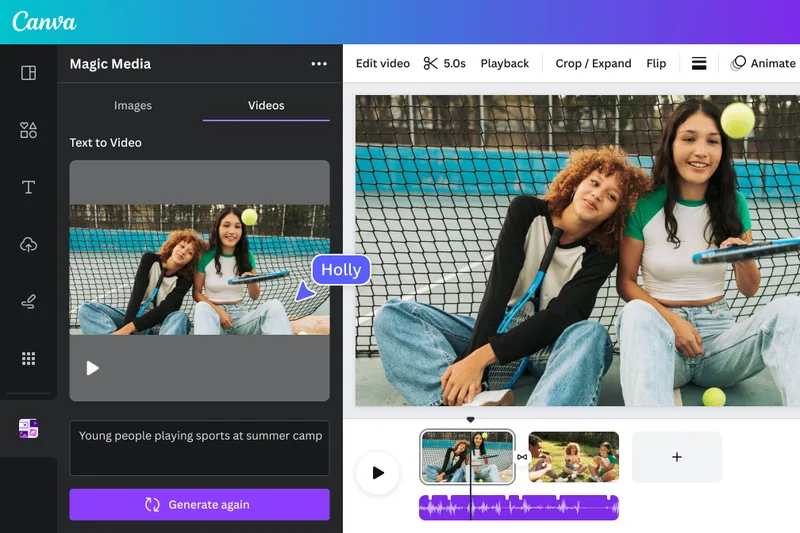
Canva's free plan includes Magic Media text-to-video clips of 4 seconds and Magic Video for 60-second edits.
Read our full take ↓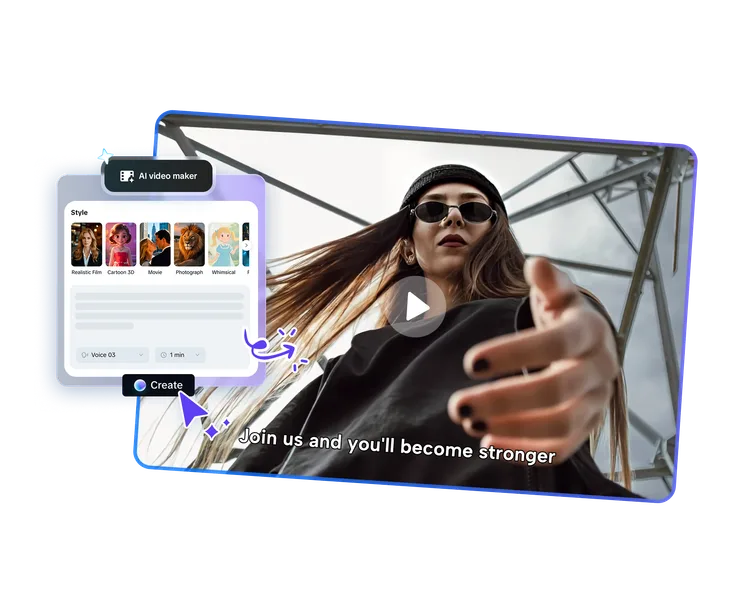
CapCut8.0/10
CapCut offers a free AI video generator on web, desktop and mobile with script, voiceover and caption tools.
Read our full take ↓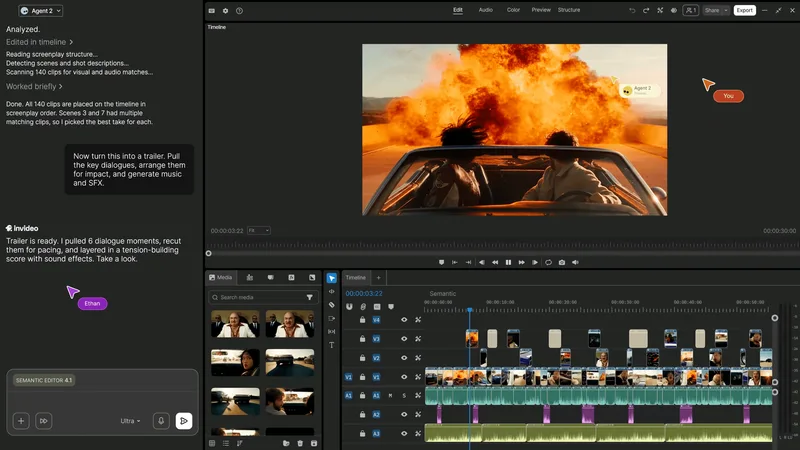
InVideo7.0/10
InVideo's free plan resets its quota weekly and builds videos from a prompt, though sources disagree on exact limits.
Read our full take ↓- CanvaBest Free Short Clips8.0
- CapCutBest Free Editor With AI Tools8.0
- InVideoBest Free Template-Based Videos7.0
- PictoryBest for Turning Scripts and Articles Into Video6.8
- HeyGenBest Free Avatar Presenter7.3
- Kling AIBest for Cinematic Clip Generation6.8
- Luma Dream MachineBest for Trying Ray Models6.5
- RunwayBest One-Time Free Credits7.0
| Product | Our score | Best for | Link |
|---|---|---|---|
| Best Free Short Clips Canva | 8.0 | Social creators who want AI clips inside a design editor | Check Canva |
| Best Free Editor With AI Tools CapCut | 8.0 | Short-form creators who want generation and editing in one place | Check CapCut |
| Best Free Template-Based Videos InVideo | 7.0 | Marketers who want a prompt-to-video workflow with stock footage | Check InVideo |
| Best for Turning Scripts and Articles Into Video Pictory | 6.8 | Content marketers repurposing blog posts into video | Check Pictory |
| Best Free Avatar Presenter HeyGen | 7.3 | Explainer and training videos with an on-screen presenter | Check HeyGen |
| Best for Cinematic Clip Generation Kling AI | 6.8 | Creators who want text-to-video clips from prompts | Check Kling AI |
| Best for Trying Ray Models Luma Dream Machine | 6.5 | Experimenters who want to try image-to-video and text-to-video models | Check Luma AI |
| Best One-Time Free Credits Runway | 7.0 | Filmmakers who want to test Gen-4 style generation before paying | Check Runway |
1. Canva — Best Free Short Clips
What we like
- Canva's help center says Magic Media videos are 4 seconds long
- Magic Video turns your clips or photos into a 60-second video on all plans, free included
- Canva says free exports carry no watermark if you use only free elements
- Everything stays in an editor that handles text, music and templates
Keep in mind
- The Veo-powered Create a Video Clip tool was announced for paid plans
- Free allowance is tied to an AI usage allowance the help pages do not quantify
- Magic Video has an hourly rate limit
Canva is the easiest free option to try if you already make social posts there. The help center says Magic Media generates video clips that are 4 seconds long, using your AI allowance, while Magic Video turns your own clips or photos into a 60-second video and is included on every plan, free included. Canva says it resets an hourly limit rather than a monthly cap on Magic Video.
The higher-end route is different. The Create a Video Clip feature, built on Google's Veo 3, was announced for Pro, Teams, Enterprise and Nonprofit users, with an initial limit of 5 generations per month, according to Canva's newsroom. A newer feature page speaks of a limited number of clips for paid users, and that page is dated, so confirm the current allowance.
On watermarks, Canva states that free-plan videos export without one as long as you use free elements, images, footage and music.
Skip it if you need cinematic clips longer than a few seconds on a free plan.
2. CapCut — Best Free Editor With AI Tools
What we like
- CapCut says its AI generator turns a prompt or script into a video
- An AI script writer drafts a video script from a topic
- Auto captions, voiceovers and AI presenter avatars are listed
- Available on web, desktop and mobile apps
Keep in mind
- No credit amounts or export caps were published on the pages we found
- Nearly every source is CapCut's own marketing
- Free-plan feature gates are unclear
CapCut is a video editor first, and its AI generation sits inside that. The vendor's free generator page describes turning a text prompt or script into a video, with an AI writer that drafts a script from a topic. Other pages mention voiceovers in different tones and accents, AI presenter avatars and automatic captions.
CapCut says exports on the free tier are high resolution without a watermark, but we could not find the credit amounts for AI generation or any export caps. That is the weakest point of this entry, because the headline claim is generous and the details are missing. Style and template counts also vary between CapCut pages.
Everything reviewed here comes from CapCut's own pages. Try it with a short project before you build a routine around it.
Skip it if you need published free-tier limits before you commit.
3. InVideo — Best Free Template-Based Videos
What we like
- InVideo's help center says the free quota resets weekly on Monday at 12 a.m. UTC
- A blog post says the free plan allows 4 exports a week
- Builds a draft video from a text prompt using stock media
- Paid plans remove the weekly caps, per the vendor
Keep in mind
- InVideo blog posts disagree on whether free generation is 10 minutes a week or a month
- Several pages say free exports are watermarked
- The help page gives no minute figure
InVideo's free plan is real but its limits are written inconsistently. The help center confirms that the free quota resets every Monday at 12 a.m. UTC, yet one InVideo blog post gives 4 exports and 10 minutes of AI generation per week, while another says 10 minutes per month. We found no official figure, so treat both as unconfirmed.
On watermarks, several InVideo and third-party pages say free exports carry one, while the AI video editor page says exports do not. That page may describe the editor rather than the generator. Paid plans remove the weekly caps, per the vendor.
InVideo also publishes a guide to free text-to-video tools that lists what each free tier caps. It is marketing, but a handy comparison of limits.
Skip it if you need a firm, published free allowance before you start.
4. Pictory — Best for Turning Scripts and Articles Into Video
What we like
- Pictory's FAQ says the free trial lasts 14 days
- The plan table lists 3 videos, 500 MB storage and 720p exports on the trial
- Generates videos from scripts, URLs, images and PowerPoint files
- A 5-minute limit applies to script and URL videos on the trial, per the plan table
Keep in mind
- One FAQ article says downloads need a subscription after the trial, while newer pages describe watermarked trial downloads
- A page says trial downloads carry a watermark
- Older articles quote a different trial quota
Pictory is a trial, not a permanent free plan, which is why it ranks lower for anyone who needs ongoing free output. The pricing FAQ says the trial lasts 14 days and, in one article, that after it ends you can log in but need a paid subscription to download. The plan table lists 3 videos, 500 MB of storage and 720p exports.
What the trial does well is repurposing. You can paste a script or article URL, and the tool builds a video from stock footage and captions. One Pictory page says trial downloads are watermarked, and an older Teams FAQ gives a different quota, so confirm in the app.
Compared with a permanent free tier, Pictory is a way to test one real project before deciding.
Skip it if you want a free tool you can keep using after two weeks.
5. HeyGen — Best Free Avatar Presenter

What we like
- HeyGen's pricing page and FAQ list 3 videos a month, up to 1 minute each
- Free users have a video quota instead of credits, per the help center
- Watermark removal is listed only on paid tiers
- Avatars and translated speech are core features
Keep in mind
- Free videos carry a watermark
- Another blog page says 3 minutes per video, contradicting the pricing page's 1 minute
- Resolution for free videos is stated inconsistently across HeyGen pages
HeyGen is built around a talking presenter, so it answers a different question than the clip generators in this list. The pricing page and FAQ both list 3 videos a month and a 1-minute maximum, and the help center says free users do not use credits and instead have a free video quota. Watermark removal appears only on paid tiers, which implies free exports are watermarked.
Resolution for free videos is stated differently across HeyGen pages, and one blog page says 3-minute videos, but the pricing page says 1 minute, so we follow the pricing page.
Skip it if you want cinematic scenes rather than a presenter reading a script.
6. Kling AI — Best for Cinematic Clip Generation
What we like
- Kling's plans page says you can start generating for free with daily credits
- Free generations include a watermark, per the vendor
- Paid tiers remove watermarks and unlock higher resolution
- Credits distributed with a membership expire after one month
Keep in mind
- Daily free credits look tied to memberships on some pages
- Plan credit numbers differ across cached pages
- Little editing beyond generation
Kling is the choice if raw generation quality matters more than editing tools. The plans page says you can begin with daily credits and that free generations carry a watermark, while paid tiers remove it and unlock higher resolution. The credits policy says membership credits are issued on first login each day and reset at 24:00, and several pages list daily free credits as a subscriber perk, so what a pure free account gets is unclear.
The Basic plan is listed at no cost. Standard, Pro, Premier and Ultra include monthly credit pools, and membership credits are valid for one month, per the credits policy.
Free output is watermarked, so it suits experiments, not client work.
Skip it if you need to publish without a watermark on a free account.
7. Luma Dream Machine — Best for Trying Ray Models
What we like
- Luma's free page says free videos carry a watermark and are for personal, non-commercial use
- Luma's licensing page says watermarks on free and Lite generations cannot be removed after an upgrade
- Luma's information page says Dream Machine has been replaced by the Ray models
- Plans for individuals are now Plus, Pro and Ultra, per the vendor
Keep in mind
- Free output cannot be used commercially
- Old guides still describe Free, Lite and Plus plans
- Credit amounts are not published for the free trial on the pages we found
Luma is a clear example of why product names need checking. Luma's own information page says Dream Machine is deprecated and has been replaced by the Ray models, currently Ray3.2, and lists Plus, Pro and Ultra for individuals. Older guides still describe Free, Lite and Plus plans, so ignore those.
The free page says videos carry a watermark and are meant for personal, non-commercial use. The licensing page goes further: watermarks on free and Lite generations cannot be removed, even if you upgrade later, and the upgrade only affects new content. One third-party site claims 30 watermarked generations a month, which we could not confirm on a Luma page.
That makes Luma a place to try the model, not to produce publishable assets for free.
Skip it if you need commercial rights on a free account.
8. Runway — Best One-Time Free Credits
What we like
- Runway's help center says the Free plan gives a one-time 125 credits that do not expire
- All Free-plan videos carry a Runway watermark
- An older help article lists Gen-4 video at 12 credits per second
- Standard and above remove the watermark
Keep in mind
- Free users cannot buy more credits
- At the older listed rate of 12 credits a second, 125 credits cover only about 10 seconds
- Credit figures vary between help articles
Runway's free plan is a sampler. The help center says it provides a one-time deposit of 125 credits that does not expire, and that free users cannot buy more; to continue generating you need Standard or above. Every free video carries a Runway watermark, which paid plans remove.
At the 12 credits per second that an older Runway help article lists for Gen-4 video, 125 credits come to just over 10 seconds of footage. Which models the Free plan can use may differ today, so check the live page.
Used for a test or two, the free credits show you the editing environment and model behavior before you decide on a plan.
Skip it if you need ongoing free generation, since the credits do not renew.
How we compared the tools
We read each vendor’s help center, pricing and plan pages and focused on the limits that decide whether a free plan is usable: clip length, monthly allowance, watermark and commercial rights. Where pages disagreed, we say so. If you are looking for the best free ai video generator for client work, check the watermark and licensing rows first, because several free tiers are for personal use only.
Comparison table
Compiled from the vendor pages in our sources. A dash means we found no published figure.
| Tool | Free allowance | Clip or video length | Watermark on free | Commercial use on free |
|---|---|---|---|---|
| Canva | Tied to AI allowance | 4 seconds (Magic Media), 60 seconds (Magic Video) | No, with free elements only | — |
| CapCut | Not published | — | Vendor says none | — |
| InVideo | Weekly quota | — | Pages conflict | — |
| Pictory | 14-day trial, 3 videos | 5 minutes (script, URL) | Reported on trial | — |
| HeyGen | 3 videos a month | 1 minute | Yes | — |
| Kling AI | Daily credits | — | Yes | — |
| Luma | Trial credits | — | Yes | Personal, non-commercial |
| Runway | 125 credits, one time | — | Yes | — |
Watermarks and commercial use
A watermark is the most common price of a free plan. Runway, Kling, HeyGen and Luma all state that free output is watermarked, and Luma adds that the watermark cannot be removed later and that free output is for non-commercial use. Canva says free exports are watermark-free when you use free elements only. Read the licensing text before you post anything for a client.
Clip generators and presenter tools
These tools solve different problems. Kling, Runway and Luma generate short cinematic clips from prompts or images. HeyGen produces a presenter reading your script, a use case also covered by voice tools such as the ones in our Speechify review and ElevenLabs pricing guide. Canva and CapCut combine light generation with a full editor, and InVideo and Pictory turn scripts or articles into stock-footage videos. Match the tool to the job instead of the biggest free allowance.
Who should skip free plans
If you publish regularly or need clean files for clients, a free plan will slow you down. Pictory’s trial ends after 14 days, Runway’s credits do not renew, and several tiers carry watermarks. A paid tier or a different category of tool is a better fit once free limits cost you time.
Frequently Asked Questions
Is there a truly free AI video generator?
Canva includes Magic Media clips and Magic Video on its free plan, HeyGen lists 3 free videos a month, and CapCut says its generator is free. Each has limits, and the vendors' pages sometimes disagree, so check them.
Do free AI video generators add watermarks?
Several do. Runway, Kling, HeyGen and Luma state that free output is watermarked. Canva says free exports have no watermark if you use only free elements.
Can I use free AI videos commercially?
Luma says free output is for personal, non-commercial use. For other tools, read the vendor's terms; we did not confirm commercial rights for every free plan.
How long are free AI video clips?
Canva's Magic Media clips are 4 seconds, HeyGen's free videos run up to 1 minute, and Runway's 125 free credits cover roughly 10 seconds at an older listed rate of 12 credits a second for Gen-4, though current model access on Free may differ.
What happens when the free trial ends?
One Pictory FAQ article says you can still log in after the 14-day trial but need a paid subscription to download; newer pages describe watermarked trial downloads, so confirm in the app.
Is Luma Dream Machine still sold?
Luma's information page says Dream Machine has been replaced by its Ray models, currently Ray3.2.
Final Verdict
Canva is the simplest free start, HeyGen is the pick for presenter videos, CapCut suits short-form editing if its undocumented limits work for you, and Kling and Runway are for testing cinematic generation. Free output is often watermarked or non-commercial, so read each vendor's terms before publishing.
Sources We Checked
Specs and features in this guide come from these manufacturer pages and independent sources, checked on Oct 14, 2026.